-

-
PowerPoint文档批量转图片工具
最新版
- 软件大小:0.65MB
- 更新日期:2022-11-14
- 下载次数:1次
- 软件语言:简体中文
- 软件授权:共享软件
- 软件评级:

- 安全检测:无插件无病毒
- 软件类型:国产软件
- 软件分类:办公软件
- 软件系统:win7及以上



PowerPoint文档批量转图片工具简介
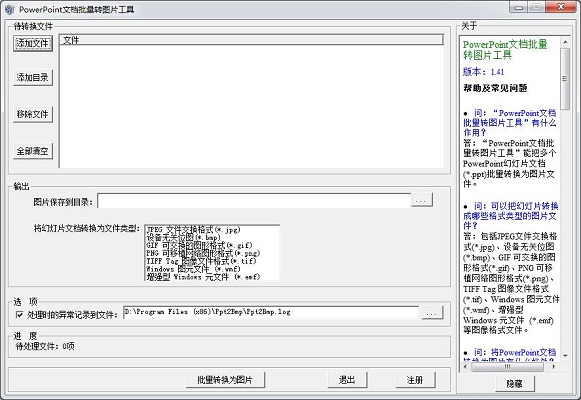
PowerPoint文档批量转图片工具最新版是一款简单易用的PPT转图片转换器软件,PowerPoint文档批量转图片工具官方版可以帮助你免费将多个PowerPoint幻灯片文档(.ppt)转换为图像文件,PowerPoint文档批量转图片工具最新版支持jpg、bmp、gif、png等多种图片文件格式。
PowerPoint文档批量转图片工具软件特色
将PowerPoint文档转换为图像有如下好处:
(1)图像的内容不容易被修改,一定程序上可以保护文档不被修改;
(2)所有机器都能显示图像文件,而只有安装了PowerPoint软件的机器才能显示PowerPoint文档,转换后,在没有安装PowerPoint的机器上也能看到文档的内容。
PowerPoint文档批量转图片工具安装方法
在pc下载网,下载PowerPoint文档批量转图片工具最新版软件包,解压,运行“exe.文件”
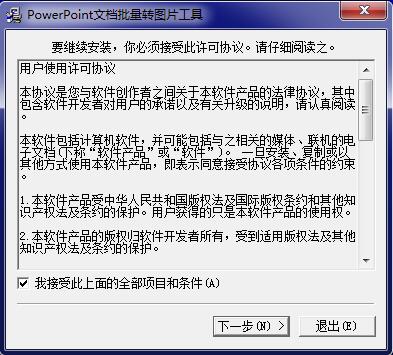
双击打开,进入安装向导,阅读协议,点击我接受,点击下一步
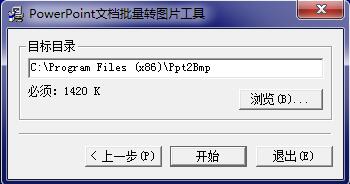
选择安装位置,默认c盘,点击开始
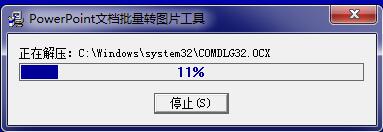
PowerPoint文档批量转图片工具最新版正在安装,耐心等待一下
安装完成,点击确定,退出安装向导

PowerPoint文档批量转图片工具支持格式 能一次性将多个PowerPoint幻灯片文档(.ppt)转换为图像文件,包括JPEG文件交换格式(.jpg)、设备无关位图(.bmp)、GIF 可交换的图形格式(.gif)、PNG 可移植网络图形格式(.png)、TIFF Tag 图像文件格式(.tif)、Windows 图元文件 (.wmf)、增强型 Windows 元文件 (.emf)等图像格式文件。
相关专题
换一换人气软件
-
抖音8.5.1.0


4.58MB|2026-09-17
-
360软件管家14.0.0.2236

95.2MB|2026-09-17
-
虎牙直播7.32.0.0

2.79 MB|2026-08-14
-
雷神加速器V11.3.1.8

88.3MB|2026-06-17
-
驱动精灵2025.8.5.220

105MB|2026-06-17
-
泡泡加速器25.12.5.1

2.92 MB|2026-05-20
- 51热搜
- 热门分类
- 热门专题


热搜推荐
-
 QQ游戏大厅5.89.58862.0
|113 MB
QQ游戏大厅5.89.58862.0
|113 MB -
 我的世界1.18.43.22
|186.26MB
我的世界1.18.43.22
|186.26MB -
 wps office12.1.0.28488
|248MB
wps office12.1.0.28488
|248MB -
 快手14.8.20.50289
|95.42MB
快手14.8.20.50289
|95.42MB -
 Steam官方版
|35.3MB
Steam官方版
|35.3MB
装机必备软件






小编推荐
-
1
抖音8.5.1.0
视频播放|
-
2
360软件管家14.0.0.2236
系统安全|
-
3
虎牙直播7.32.0.0
视频播放|
-
4
雷神加速器V11.3.1.8
网络加速|
-
5
驱动精灵2025.8.5.220
硬件工具|
-
6
泡泡加速器25.12.5.1
网络加速|
-
7
万能数据恢复大师7.0.1.1

数据恢复|
-
8
红手指云手机v4.12.081

游戏软件|
-
9
迅游网游加速器8.0

网络加速|
-
10
苹果恢复大师3.8.38.2362最新版

数据恢复|