
-

-
tracert.exe
官方版
- 软件大小:0.16MB
- 更新日期:2024-12-26
- 下载次数:2次
- 软件语言:简体中文
- 软件授权:免费软件
- 软件评级:

- 安全检测:无插件无病毒
- 软件类型:国产软件
- 软件分类:系统辅助
- 软件系统:WinAll






tracert.exe简介
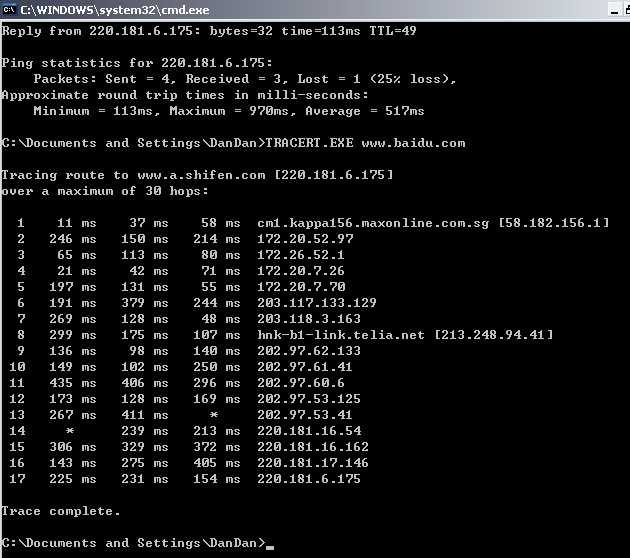
Tracert 先发送 TTL 为 1 的回应数据包,并在随后的每次发送过程将TTL递增 1,直到目标响应或 TTL 达到最大值,从而确定路由。通过检查中间路由器发回的“ICMP 已超时”的消息确定路由。某些路由器不经询问直接丢弃 TTL 过期的数据包,这在 Tracert 实用程序中看不到。

命令
tracert为trace router的缩写。
按顺序打印出返回“ICMP 已超时”消息的路径中的近端路由器接口列表。如果使用 -d 选项,则 Tracert 实用程序不在每个 IP 地址上查询 DNS。
在下例中,数据包必须通过两个路由器(10.0.0.1 和 192.168.0.1)才能到达主机172.16.0.99。主机的默认网关是 10.0.0.1,192.168.0.0 网络上的路由器的 IP 地址是 192.168.0.1。
C:>tracert 172.16.0.99 -d
Tracing route to 172.16.0.99 over a maximum of 30 hops
1 2s 3s 2s 10,0.0,1
2 75 ms 83 ms 88 ms 192.168.0.1
3 73 ms 79 ms 93 ms 172.16.0.99
Trace complete.
相关专题
换一换人气软件
-
抖音8.5.1.0


4.58MB|2026-09-17
-
360软件管家14.0.0.2236

95.2MB|2026-09-17
-
虎牙直播7.32.0.0

2.79 MB|2026-08-14
-
雷神加速器V11.3.1.8

88.3MB|2026-06-17
-
驱动精灵2025.8.5.220

105MB|2026-06-17
-
泡泡加速器25.12.5.1

2.92 MB|2026-05-20


热搜推荐
-
 我的世界1.18.43.22
|186.26MB
我的世界1.18.43.22
|186.26MB -
 wps office12.1.0.28488
|248MB
wps office12.1.0.28488
|248MB -
 快手14.8.20.50289
|95.42MB
快手14.8.20.50289
|95.42MB -
 Steam官方版
|35.3MB
Steam官方版
|35.3MB -
 爱奇艺14.8.5.10228
|67.38MB
爱奇艺14.8.5.10228
|67.38MB
装机必备软件






小编推荐
-
1
抖音8.5.1.0
视频播放|
-
2
360软件管家14.0.0.2236
系统安全|
-
3
虎牙直播7.32.0.0
视频播放|
-
4
雷神加速器V11.3.1.8
网络加速|
-
5
驱动精灵2025.8.5.220
硬件工具|
-
6
泡泡加速器25.12.5.1
网络加速|
-
7
万能数据恢复大师7.0.1.1

数据恢复|
-
8
红手指云手机v4.12.081

游戏软件|
-
9
迅游网游加速器8.0

网络加速|
-
10
苹果恢复大师3.8.38.2362最新版

数据恢复|
最新软件
-
 MicroKMS神龙版
0.16MB/2024-12-26
-
 KMS激活工具
0.16MB/2024-12-26
-
KMS激活工具
0.16MB/2024-12-26
-
 11对战平台
0.16MB/2024-12-26
-
 优启通u盘启动盘制作工具
0.16MB/2024-12-26
-
 优启通(u盘启动盘制作工具)
0.16MB/2024-12-26