
-

-
Sqlite工具(SqliteStudio)
3.1.1 绿色中文版
- 软件大小:14MB
- 更新日期:2018-03-29
- 下载次数:0次
- 软件语言:简体中文
- 软件授权:免费软件
- 软件评级:

- 安全检测:无插件无病毒
- 软件类型:国产软件
- 软件分类:数据库类
- 软件系统:Win All



Sqlite工具(SqliteStudio)简介
SqliteStudio是一款 Sqlite数据库可视化工具,是使用Sqlite数据库开发应用的必备软件,软件无需安装,下载后解压即可使用,很小巧但很了用,绿色中文版本。比起其它SQLite管理工具,我喜欢用这个。很方便易用,不用安装的单个可执行文件,支持中文。
SQLiteStudio 是一个跨平台的 SQLite 数据库的管理工具,采用 Tcl 语言开发。
SQLiteStudio的特色:
功能完善的sqlite2和sqlite3工具,视图编码支持utf8。
支持导出数据格式:csv、html、plain、sql、xml,
可同时打开多个数据库文件
支持查看和编辑二进制字段
SqliteStudio怎么用?
使用“sqlitestudio”打开(也可以使用其它sqlite可视化工具,个人习惯使用该工具,多语言小巧无需安装)
1、打开sqlitestudio ”数据库“-”添加数据库“
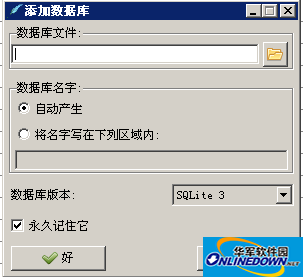
2、选择导出的那个数据库文件直接打开即可。
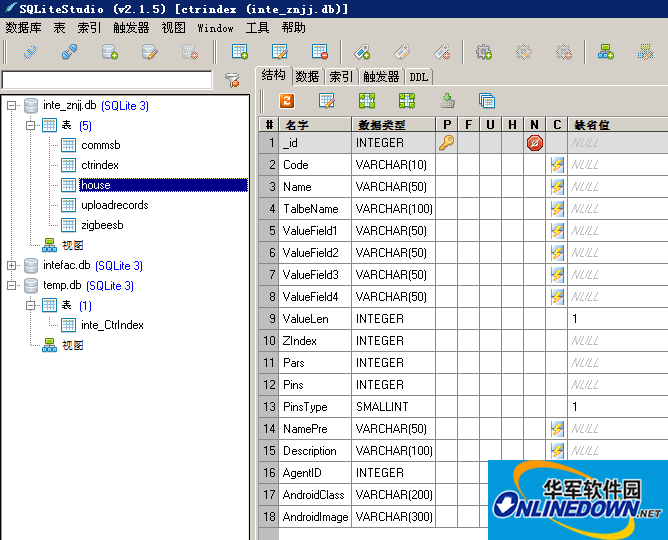
3、在sqlitestudio 可以创建和修改表也可以执行SQL语句基本可以满足常用需求
在sqlitestudio 导出表数据直接右键”导出表“ 默认格式CSV文件
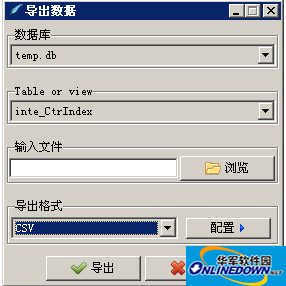
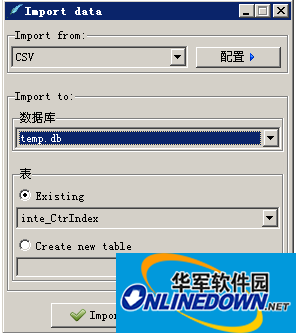
4、导入表数据:
右键表名“import data to table”
SqliteStudio在Android程序中使用已有的SQLite数据库
1. 准备SQLite database文件
假设你已经创建了一个sqlite数据库,我们需要对其进行一些修改。
(译者注:这里原文是推荐了一个SQLite数据库管理软件,这个我觉得可以随自己的喜好,最Windows下面有多款可视化的SQlite数据库管理软件,可以方便的读取,编辑数据库,例如我用的是sqlitestudio
打开数据库,添加一个新的table “android_metadata",插入一行数据,具体的SQL如下:
[sql] view plaincopyprint?在CODE上查看代码片派生到我的代码片
CREATE TABLE "android_metadata" ("locale" TEXT DEFAULT 'en_US')
INSERT INTO "android_metadata" VALUES ('en_US')
(译者注:上面两行是表明需要进行的操作,具体可以直接在sqlitesstudio中完成)
然后你需要对你数据表格的primary id 列重命名为 “_id”,这样Adroid会知道怎么对id列进行绑定,你可以很容易的在SQlite数据库管理软件中进行列编辑。
这两步之后,你的sqlite数据库文件就准备好了。
(译者注:这里我保留了id列,即没有对其进行重命名,测试证明也是没有问题的)
2. 在你的Android程序中复制,打开以及访问数据库
现在把你上一步准备好的数据库文件放在“assets”文件夹下面,然后通过继承 SQLiteOpenHelper类来创建一个Database Helper类,
你的DataBaseHelper类大致可以如下:
public class DataBaseHelper extends SQLiteOpenHelper{
//The Android's default system path of your application database.
private static String DB_PATH = "/data/data/YOUR_PACKAGE/databases/";
private static String DB_NAME = "myDBName";
private SQLiteDatabase myDataBase;
private final Context myContext;
/**
* Constructor
* Takes and keeps a reference of the passed context in order to access to the application assets and resources.
* @param context
*/
public DataBaseHelper(Context context) {
super(context, DB_NAME, null, 1);
this.myContext = context;
}
/**
* Creates a empty database on the system and rewrites it with your own database.
* */
public void createDataBase() throws IOException{
boolean dbExist = checkDataBase();
if(dbExist){
//do nothing - database already exist
}else{
//By calling this method and empty database will be created into the default system path
//of your application so we are gonna be able to overwrite that database with our database.
this.getReadableDatabase();
try {
copyDataBase();
} catch (IOException e) {
throw new Error("Error copying database");
}
}
}
/**
* Check if the database already exist to avoid re-copying the file each time you open the application.
* @return true if it exists, false if it doesn't
*/
private boolean checkDataBase(){
SQLiteDatabase checkDB = null;
try{
String myPath = DB_PATH + DB_NAME;
checkDB = SQLiteDatabase.openDatabase(myPath, null, SQLiteDatabase.OPEN_READONLY);
}catch(SQLiteException e){
//database does't exist yet.
}
if(checkDB != null){
checkDB.close();
}
return checkDB != null ? true : false;
}
/**
* Copies your database from your local assets-folder to the just created empty database in the
* system folder, from where it can be accessed and handled.
* This is done by transfering bytestream.
* */
private void copyDataBase() throws IOException{
//Open your local db as the input stream
InputStream myInput = myContext.getAssets().open(DB_NAME);
// Path to the just created empty db
String outFileName = DB_PATH + DB_NAME;
//Open the empty db as the output stream
OutputStream myOutput = new FileOutputStream(outFileName);
//transfer bytes from the inputfile to the outputfile
byte[] buffer = new byte[1024];
int length;
while ((length = myInput.read(buffer))>0){
myOutput.write(buffer, 0, length);
}
//Close the streams
myOutput.flush();
myOutput.close();
myInput.close();
}
public void openDataBase() throws SQLException{
//Open the database
String myPath = DB_PATH + DB_NAME;
myDataBase = SQLiteDatabase.openDatabase(myPath, null, SQLiteDatabase.OPEN_READONLY);
}
@Override
public synchronized void close() {
if(myDataBase != null)
myDataBase.close();
super.close();
}
@Override
public void onCreate(SQLiteDatabase db) {
}
@Override
public void onUpgrade(SQLiteDatabase db, int oldVersion, int newVersion) {
}
// Add your public helper methods to access and get content from the database.
// You could return cursors by doing "return myDataBase.query(....)" so it'd be easy
// to you to create adapters for your views.
}
就这样。
现在你可以创建一个新的DataBaseHelper实例,然后调用createDataBase(),然后再调用openDataBase()方法,记住修改DB_PATH字符串中“YOUR_PACKAGE”为你真正的package名称(也就是说com.examplename.myapp)
以下是示范代码:
[java] view plaincopyprint?在CODE上查看代码片派生到我的代码片
...
DataBaseHelper myDbHelper = new DataBaseHelper();
myDbHelper = new DataBaseHelper(this);
try {
myDbHelper.createDataBase();
} catch (IOException ioe) {
throw new Error("Unable to create database");
}
try {
myDbHelper.openDataBase();
}catch(SQLException sqle){
throw sqle;
}
...
相关专题
换一换人气软件
-
抖音电脑版8.5.1.0


4.58MB|2026-09-11
-
虎牙直播7.32.0.0

2.79 MB|2026-08-14
-
360软件管家V14.0.0.2236

95.2MB|2026-07-23
-
雷神加速器V11.3.1.8

88.3MB|2026-06-17
-
驱动精灵2025.8.5.220

105MB|2026-06-17
-
泡泡加速器25.12.5.1

2.92 MB|2026-05-20
- 51热搜
- 热门分类
- 热门专题


热搜推荐
-
 Steam官方版
|35.3MB
Steam官方版
|35.3MB -
 爱奇艺14.8.5.10228
|67.38MB
爱奇艺14.8.5.10228
|67.38MB -
 我的世界1.18.41.2
|185.44MB
我的世界1.18.41.2
|185.44MB -
 QQ游戏大厅5.89.58862.0
|113 MB
QQ游戏大厅5.89.58862.0
|113 MB -
 360压缩4.0.0.1670
|16.0 MB
360压缩4.0.0.1670
|16.0 MB
装机必备软件






小编推荐
-
1
抖音电脑版8.5.1.0
视频播放|
-
2
虎牙直播7.32.0.0
视频播放|
-
3
360软件管家V14.0.0.2236
系统安全|
-
4
雷神加速器V11.3.1.8
网络加速|
-
5
驱动精灵2025.8.5.220
硬件工具|
-
6
泡泡加速器25.12.5.1
网络加速|
-
7
万能数据恢复大师7.0.1.1

数据恢复|
-
8
红手指云手机v4.12.081

游戏软件|
-
9
迅游网游加速器8.0

网络加速|
-
10
苹果恢复大师3.8.38.2362最新版

数据恢复|
最新软件
-
 SQLiteStudio
14MB/2018-03-29
-
 Access
14MB/2018-03-29
-
 MySQL Workbench
14MB/2018-03-29
-
 Navicat for MySQL
14MB/2018-03-29
-
 Access
14MB/2018-03-29
-
 Access
14MB/2018-03-29